Wingdings Translator
Convert your regular text into Wingdings symbols with just a click on our online translator for free! The special font will turn each letter or digit into fascinating symbols such as arrows, stars, emoticons and much more. You can use the service to communicate in a secret language, to make cool pictures, solve interesting quizzes and do many other things.
Input Text
⬡ Wingdings 1
⬢ Wingdings 2
⬣ Wingdings 3
🌐 Webdings
What Is Wingdings?
Wingdings refers to a collection of fonts that uses letters to create various symbols. These fonts were created by Microsoft in the 1990s and have remained very popular ever since then. Rather than showing regular letters such as "A" and "B," Wingdings replaces them with symbols such as arrows and hearts, among others.
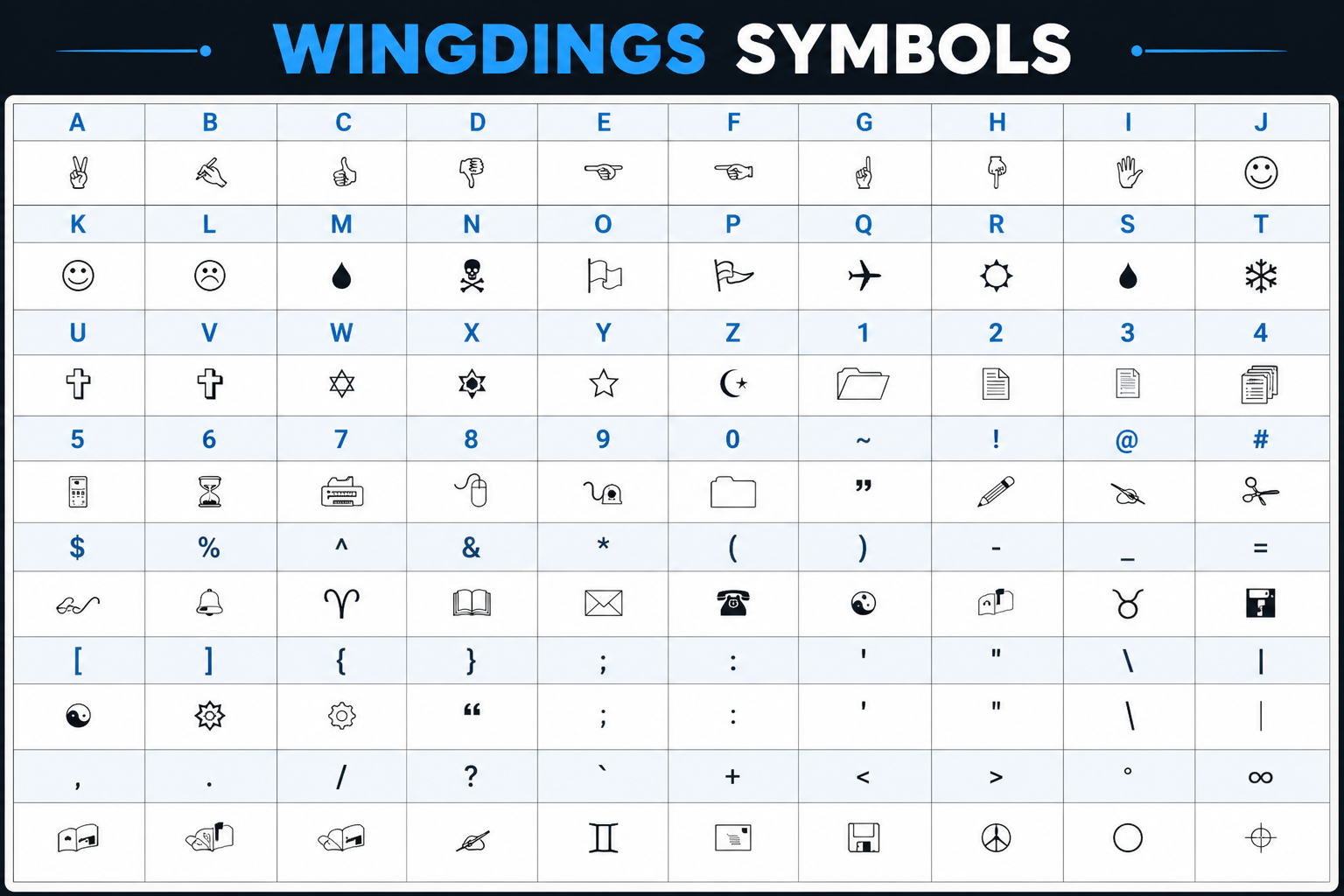
There are three main types of Wingdings:
- Wingdings 1: The original font that includes basic symbols such as arrows, stars, and everyday objects.
- Wingdings 2: This font includes additional arrows, hands, and shapes to increase the variety of symbols.
- Wingdings 3: It also includes a range of lines and arrows.
How to Use the Wingdings Translator
It's really simple to use our Wingdings Translator. Just follow these steps:
- Insert Your Text: Enter the text that needs to be transformed into the designated area.
- Transform the Text: Hit the "Transform" option, and your text will automatically get converted into Wingdings symbols.
- Copy the Transformed Text: Once your text is transformed, you can simply copy the Wingdings symbols using the "Copy" option.
- Paste Where You Want: Simply paste the Wingdings symbols in your text anywhere you want.
- Revert the Symbols: If needed, you can revert the symbols back into text by pasting them in the input area and transforming them.
Why Use Wingdings?
Wingdings turns plain text into expressive icons, giving your words a creative twist.
- Creative Design: Make your posters, presentations and social media efforts more creative.
- Hidden Messages: Write messages that only other Wingdings lovers will understand.
- Interesting Puzzles: Develop brain teasers using Wingdings characters.
- Universal Compatibility: Easily copy and paste Wingdings due to their Unicode support.
Unicode & Compatibility
Both of the Wingdings and Webdings fonts are based on the Unicode standard, which is an international text standard and makes sure that your icons look exactly the same across all devices, browsers, and platforms globally.
Are you getting empty squares or question marks instead of icons? This mostly indicates that the application or web site does not fully support Unicode. Do not get panic—simply copy the decoded text or use up-to-date browsers such as Chrome, Edge, or Firefox.
Extra Features
Our Wingdings Translator comes packed with powerful features to make every conversion seamless:
- Complete Font Support – Works with Wingdings 1, 2, 3, and Webdings.
- Two-Way Translation – Switch between Encode and Decode modes with one click.
- Easy Sharing – Copy your converted text or download it as an image.
- Universal Compatibility – Unicode-supported output works everywhere.
- 100% Private – All conversions happen locally in your browser. We never store, save, or transmit your text or images.
Frequently Asked Questions
Copy your Wingdings characters to the provided input field and hit Decode button. Your text will be converted from Wingdings symbols into understandable English text in seconds. Or, if you like, use Wingdings to English Translator page where decoding is done automatically. You can copy any text along with Wingdings, and the translator will decode only Wingdings parts.
Just type or paste your regular text into the box and then click Encode. Your text will be converted to Wingdings symbols instantly. The English to Wingdings converter is perfect if you need a dedicated application to encode your text to Wingdings symbols only.
Yes! Launch Image OCR Translator and import any image file having Wingdings or Webdings characters. The program makes use of OCR technology to process the image locally and provides the decoded text instantly without having to send the image to any server.
Indeed, you can simply change the Font Style selection from Wingdings to Webdings or you can access the Webdings Translator directly. Webdings offers icons such as airplanes, folders, and smileys, all of which work in the same manner.
Refer to our Font Download tutorial to download the official Wingdings font (.TTF) safely. The website will show you how to install the font on Windows, Mac OS X, and Android operating systems and also provide you with safe alternatives.
This typically occurs when the application you are using does not have full Unicode capabilities. Consider using the decoded text or trying out more modern browsers like Chrome or Edge instead.
Yes. All conversions take place entirely on your computer browser; not a single piece of data, image, or text is uploaded to our server. The Image OCR tool even works without the need for any server interaction on your local machine.